Multimeters & Electrical Testers
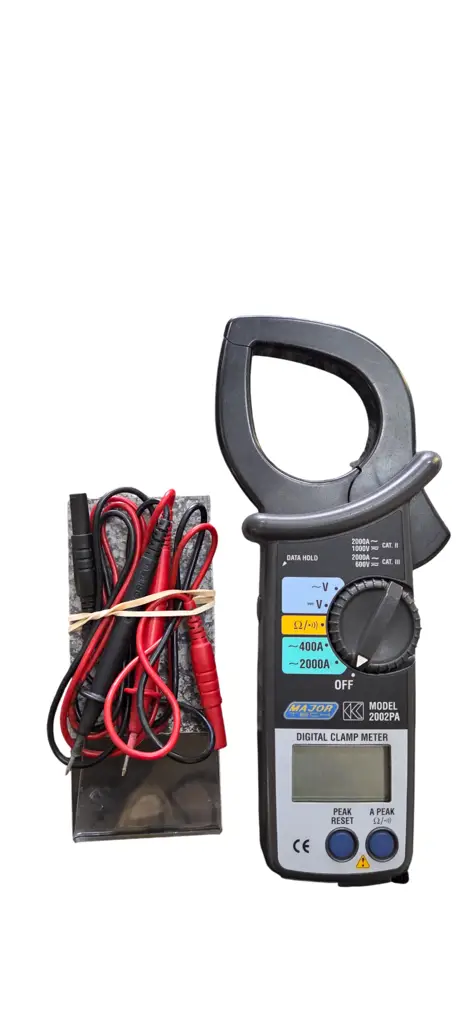
2000A Professional Ac Clamp Meter
R 1 749
Store Newcastle

Copyright © 2026, Cash Converters. All Rights Reserved.

4. MEASURING PROCEDURE 4.1. CURRENT SOURCE 1. Insert the black test lead banana plug into the negative (COM) jack and the red test lead banana plug into the positive (mV-mA) jack. 2. Set the Function Switch to the "CURRENT (mA) source" position. 3. Press the "0~19.9mA" key for getting the 0.01mA display resolution (max display is 19.99mA); press the "0~24mA" key for getting the 0.1mA display resolution 4. Adjust the "Calibration Adjust knob" to generate the current output same as the display value. 4.2. CURRENT MEASUREMENT 1. insert the black test lead banana plug into the negative (COM) jack and the red test lead banana plug into the positive (mV-mA) jack. 2. Set the Function Switch to the "CURRENT (mA) measure" position. 3. Press the "0~19.9mA" key for getting the 0.01mA display resolution (max display is 19.99mA); press the "0~24mA" key for getting the 0.1mA display resolution 4. Remove power from the circuit under test, then open up the circuit at the point where you wish to measure current. 5. Touch the black test probe tip to the negative side of the circuit. Touch the red test probe tip to the positive side of the circuit, and read the current value in the display. 4.3. POWER AND CURRENT MEASUREMENT OF TWO WIRE LOOP. 1. Insert the black test lead banana plug into the negative (COM) jack and the red test lead banana plug into the positive (mV-mA) jack. 2. Set the Function Switch to the "POWER/mA measure" position. 3. Press the "0~19.9mA" key for getting the 0.01mA display resolution (max display is 19.99mA); press the "0~24mA" key for getting the 0.1mA display resolution 4. Open up the circuit in which is to be measured and connect the red test probe and the black test probe securely in series with the load in which the current is to be measured. 4.4. DC mV SOURCE 1. Insert the black test lead banana plug into the negative (COM) jack and the red test lead banana plug into the positive (mV-mA) jack. 2. Set the Function Switch to the "Voltage (mV) source" position. 3. Adjust the "Calibration Adjust knob" to generate the voltage (mV) output same as the display value. For more information contact Enock at 0680725360
1. FEATURES
1. Portable instrument for calibrating process devices and measuring
process signals.
2. Adjustable 0-24mA current source.
3. Adjustable -199.9mV to +199.9mV DCV source.
4. Current calibrator drives loads up to 500 ohms.
5. The instrument powers or measures a two-wire current loop.
6. Four function provide the quality and accuracy of handheld calibrator:
1. Precision current source,
2. Measurement of a current signal,
3. Power and measurement of two wire loop,
4. Precision DC mV source.
2. SPECIFICATIONS
2.1. GENERAL SPECIFICATIONS
Display LCD display, max display counts 1999.
Function 1. Current source
2. Current measurement
3. Power and current measurement of
4. DC mV source
Sampling Time Approx. 0.4 second
Over input Indication Indication of "1".
Operating 0°C to 50°C (32°F to 122°F).
Environment at 20mA current for loads up to 400 ohms.
*FS:full scale
3.2. CURRENT MEASUREMENT
Range
0-19.99mA
0-24mA
Display Resolution
0.01mA
Accuracy
±(0.25%FS+1d)
0.1mA
*FS:full scale
±(0.5%FS+1d)
3.3. POWER AND CURRENT MEASUREMENT OF TWO WIRE LOOP
Range
0-19.99mA
0-24mA
Display Resolution
0.01mA
Accuracy
±(0.25%FS+1d)
0.1mA
±(0.5%FS+1d)
*Provides power DC 12V ±2V to the loop and measures current.
*FS:full scale
3.4. DC mV SOURCE
Range -199.9mV to
+199.9mV
Display Resolution
Accuracy
0.1mV
±(0.25%FS+1d)
*Output measured load impedance should>1K ohms.
*FS:full scale
Remark:
The above specifications are tested under the environment RF Field
Strength less than 3V/M & frequency less than the30 MHz only.
More products in Multimeters & Electrical Testers.

Cash Converters Elgin Mall